
Alex Anikienko
Expert Writer
December 9, 2025
Alex Anikienko
Expert Writer
December 9, 2025
According to global email benchmarks, the typical open rate hovers around 15–25%. However, brands that use AI-powered send-time optimization sometimes report open rates that are up to 50% higher than their old schedules.
Meanwhile, the average app user receives around 46 push notifications per day, so marketers are actually fighting for a tiny slice of attention.
Imagine you’re sending a newsletter to 100,000 subscribers at 10 AM on Tuesday, convinced that it’s the best time for maximum impact. But while a few early birds click through, what about the rest? They’re buried in inboxes and forgotten amid the morning chaos.
Enter send-time personalization (STP), the smart, scalable way to hit “Send” when your audience is paying attention. It allows you to stop guessing and start keeping up with the actual rhythms of your users’ lives. But behind the buzzword, there’s a serious question:
How do you actually build per-user send-time models without turning your CRM into a science project?
Let’s demystify it using a clear methodology with practical applications for real-time personalization, as you would implement in Reteno.
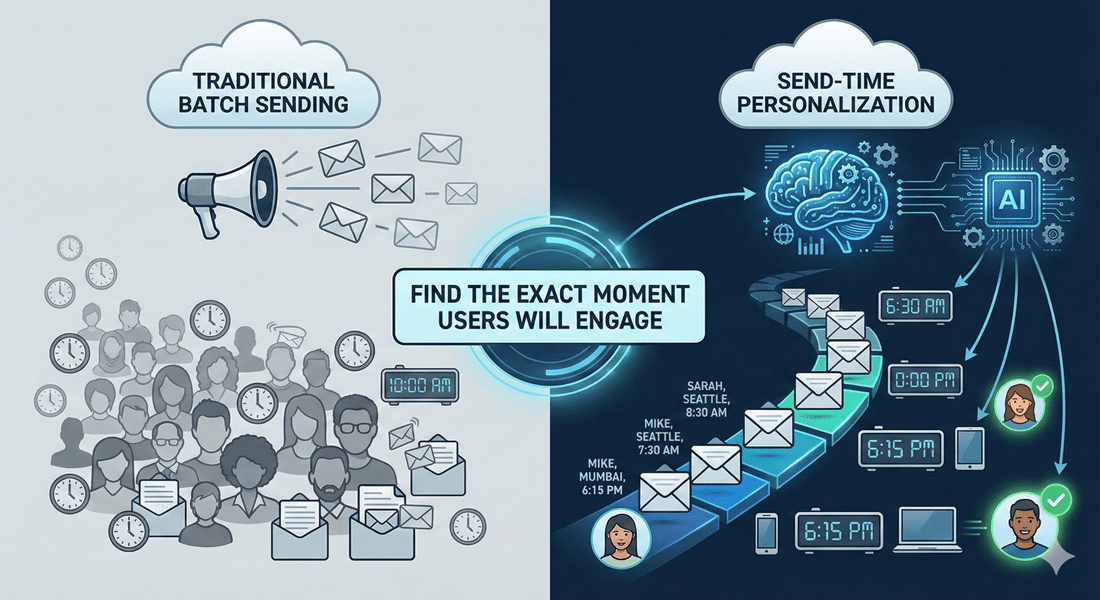
At its core, send-time personalization employs artificial intelligence (AI) to analyze consumers’ historical engagement, including opens, clicks, and device activity. Then, it predicts the best time to deliver your messages. Statistics from 2025 show that teams using AI for email personalization reported a 41% increase in revenue and a 13.44% higher click-through rate.
Think of send-time personalization as a smart messaging alarm clock: instead of blasting everyone at once, notifications queue up and deploy individually. It allows you to reach Sarah in Seattle as she sips her morning coffee, and Mike in Mumbai as he finishes his workday.
As an optimizer of an already-good messaging strategy, STP helps your lifecycle and event-driven campaigns land when each user is most likely to notice and act the way you want.
Nevertheless, there are a few key things to clear up.
Although it may sound like coding a spaceship from scratch, crafting a send-time model is more like tuning a guitar. Collect data, group events, and identify “golden hours.” Here’s how to do it, based on real-world tactics from Reteno.
A viable model starts with clean, accessible user information rather than AI messaging itself.
Consider the following aspects:
In Reteno, this dataset is powered by real-time events, dynamic segments, and profile attributes, which update automatically as users interact with your product.
You don’t need a data science team to improve your send-time strategy. A simple optimization approach can deliver meaningful conversion lift while remaining easy to implement in your CRM.
Here’s the most effective, frictionless way to get started:
Map each open or click to the user’s local hour (0–23). Recent activity should carry more weight than older interactions to reflect current behavior patterns.
When creating the hourly buckets, patterns will quickly emerge. Perhaps the user consistently opens between 6 PM and 8 PM, or maybe they’re most active around 7 AM on weekdays. Your goal is to identify the hours when motivation peaks.
Add designations like “preferred_send_hour_email” or “preferred_send_window_push” to the user profile. This will make the insight usable across your campaigns and A/B tests.
With these attributes in place, subscribers can automatically flow into behavioral segments such as:
Then, apply the permitted send-time windows within your workflows so that each segment receives the same campaign during its preferred time range.
This approach yields immediate engagement improvements without requiring extensive analytical work. It’s the fastest way to optimize timing and establish a solid foundation for more advanced per-user predictions.
User behavior doesn’t follow a straight line. It fluctuates based on holidays, shopping cycles, cultural events, and even the weather. These changes directly influence when people check their phones and inboxes. They can also meaningfully affect the performance of your send-time models.
Recent research reveals the following patterns:
To keep your send-time models performing well during these volatile periods, apply the following best practices:
Send-time personalization gives your product a competitive edge. By combining clean behavioral data, dynamic segmentation, and AI-powered timing, you can deliver messages that meet users where they are, guiding them to your value proposition. Add event-triggered campaigns to the mix, and you get a messaging engine that feels natural, relevant, and effortless at scale.
Reteno gives you everything you need to turn timing into a revenue booster, including real-time events, AI-assisted messaging, dynamic segments, and fully configurable send-time controls.
Take the next step:
👉 Choose a Reteno plan and start optimizing your messaging today.
👉 Or book a personalized demo and see how timing + AI + events can lift your conversions.
(1).png)
(1).png)
.png)

Are your pushes as compelling as they could be? Find out with our free preview tool. Instantly see how your notifications will display on iOS and Android, in both expanded and collapsed views.
This is your chance to fine-tune your messages to ensure they're not just seen but felt. Make every character and every push work harder for your engagement goals


