
Anastasiia Malyhina
September 25, 2026
Anastasiia Malyhina
September 25, 2026

Ваші користувачі можуть розуміти англійську. Але це не означає, що вони хочуть спілкуватися з брендом лише англійською.
Мова впливає на те, як швидко люди розуміють пропозицію, наскільки їй довіряють і чи вважають повідомлення доречним для себе. CSA Research з’ясувала, що 76% споживачів обрали б продукт з інформацією рідною мовою замість аналогічного продукту без неї. Серед людей, які не розмовляють англійською, цей показник зростає до 89%.
Для email-маркетологів аргументи на користь локалізації очевидні. Складність — в організації процесу.
Кожна додаткова мова означає більше тем листів, прехедерів, кнопок, основних і юридичних текстів, посилань та візуальних елементів для перевірки. Кампанія, перекладена вісьмома мовами, — це вже не один лист. Це дев’ять версій, які мають залишатися узгодженими й водночас звучати природно на кожному ринку.
Reteno допомагає командам скоротити цю ручну роботу завдяки багатомовним шаблонам листів, імпорту й експорту через Google Sheets та локалізації за допомогою ШІ в Reteno Agent.
Прямий переклад передає текст іншою мовою. Локалізація адаптує повідомлення до того, як люди спілкуються на конкретному ринку.
Вона охоплює такі деталі:
Навіть граматично правильний переклад може здаватися дивним, якщо ігнорувати ці деталі. Користувач може розуміти кожне слово, але все одно відчувати, що повідомлення написали для когось іншого.
Це важливо навіть на ринках із високим рівнем володіння іноземними мовами. За даними Євробарометра Європейської комісії за 2024 рік, 59% європейців можуть підтримувати розмову щонайменше однією іноземною мовою. Водночас попереднє дослідження ЄС показало, що 90% європейських інтернет-користувачів усе ж воліли переглядати сайти рідною мовою.
Розуміти іншу мову й хотіти отримувати нею комерційні повідомлення — не те саме.
Багато команд починають локалізацію з простого процесу: дублюють початковий лист, надсилають текст перекладачу та вставляють переклад назад у шаблон.
Це може працювати для двох мов і нерегулярних кампаній. Але коли компанія виходить на кілька ринків або запускає багато автоматизованих сценаріїв, процес ускладнюється.
Найпоширеніші проблеми пов’язані з організацією роботи.
Коли кожна мова зберігається в окремому листі, маркетологи мають оновлювати кожен шаблон незалежно. Зміну кнопки, застереження, посилання чи акційної пропозиції потрібно повторити в усіх версіях.
Окремі шаблони також ускладнюють сценарії. Командам можуть знадобитися додаткові сегменти, мовні умови й блоки повідомлень, щоб кожен користувач отримав потрібний лист.
Багатомовні повідомлення Reteno зберігають основну та локалізовані версії в одному повідомленні. Під час запуску кампанії платформа може вибрати відповідну версію за мовою контакту. Якщо такої версії немає, використовується основна мова.
Маркетологи, перекладачі, дизайнери й місцеві команди часто працюють у різних системах. Текст може переміщуватися між редактором листів, таблицями, документами, гілками чатів та інструментами керування проєктами.
Без єдиного структурованого формату складно визначити:
Перекладач повинен мати змогу оновлювати текст, не торкаючись HTML, CSS, посилань, змінних та інших функціональних елементів.
Копіювання повного коду листа в зовнішні файли збільшує ймовірність випадкових змін. Ручне копіювання тексту створює інший ризик: маркетолог може пропустити прихований прехедер, текст на зображенні, футер або умовний блок контенту.
Додати вісім мов — означає не лише підготувати вісім перекладів. Це також перевірити вісім тем листів, вісім прехедерів, вісім наборів посилань, вісім макетів і вісім повних версій повідомлення.
ШІ може прискорити підготовку листів, але контроль якості залишається важливим. Litmus називає перевірку якості та людський нагляд ключовими навичками роботи з електронними листами, оскільки ШІ бере на себе дедалі більше завдань із їх підготовки.
Функція керування перекладами в Reteno дає командам змогу експортувати й імпортувати мовні версії листів через Google Sheets, а також локальні файли CSV і XLSX.
Замість надсилання повних шаблонів листів перекладачам маркетологи можуть надати структуровану таблицю з текстом, який потрібно локалізувати.
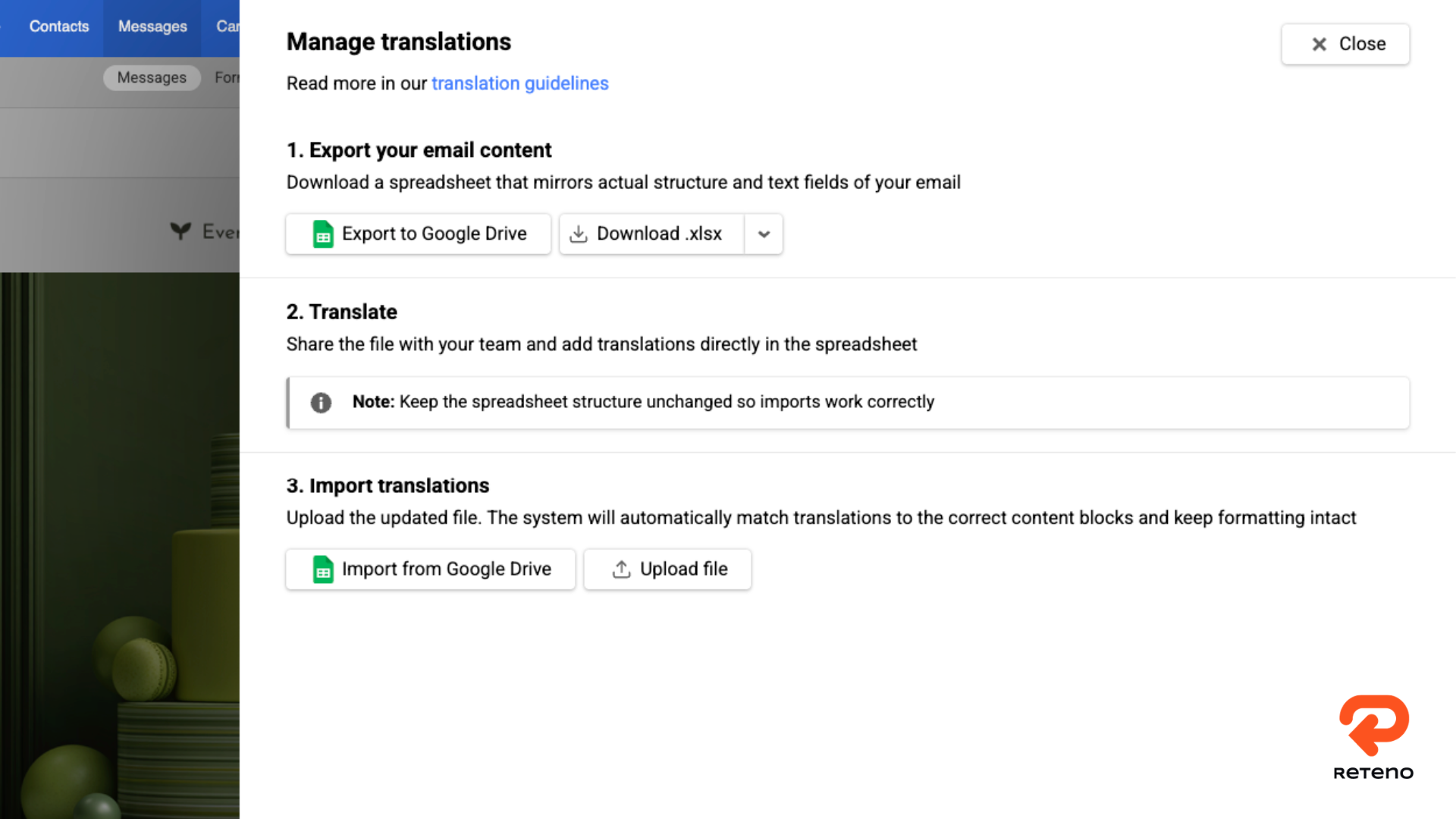
Процес працює так:
Експортований аркуш містить метадані, ключі перекладу та мовні стовпці. В одному файлі Google Sheets можна використовувати різні аркуші, щоб організувати роботу з кількома шаблонами або етапами перекладу без створення нового файлу для кожного завдання.
Під час імпорту Reteno зчитує вибраний аркуш, перевіряє його структуру й мовні стовпці та порівнює таблицю з перекладами, збереженими в листі. Маркетологи можуть переглянути виявлені відмінності, перш ніж застосувати їх.
Цей етап підтвердження захищає наявний лист від неповного імпорту або імпорту даних із неправильною структурою.
Google Sheets надає перекладачам і редакторам зрозумілий простір для співпраці. Reteno Agent пропонує інший варіант, коли команда хоче створювати або оновлювати мовні версії безпосередньо.
Маркетолог може попросити агента відкрити наявний шаблон, перекласти його вміст, створити потрібні мовні версії та зберегти їх у Reteno. Завдання може охоплювати тему, прехедер, видимий текст, кнопки й навіть текст на зображеннях.
Наприклад:
Відкрий шаблон з ID 1234567 і додай німецьку, французьку, італійську, польську, нідерландську, японську, латиноамериканську іспанську та бразильську португальську версії. Переклади тему, прехедер і весь видимий текст. Збережи посилання без змін і дотримуйся збережених вимог до локалізації.
Агент зчитує шаблон, створює версії та зберігає їх у наявному листі. Розмова залишається в гілці Slack, тож команда має запис запиту та статусу виконання.
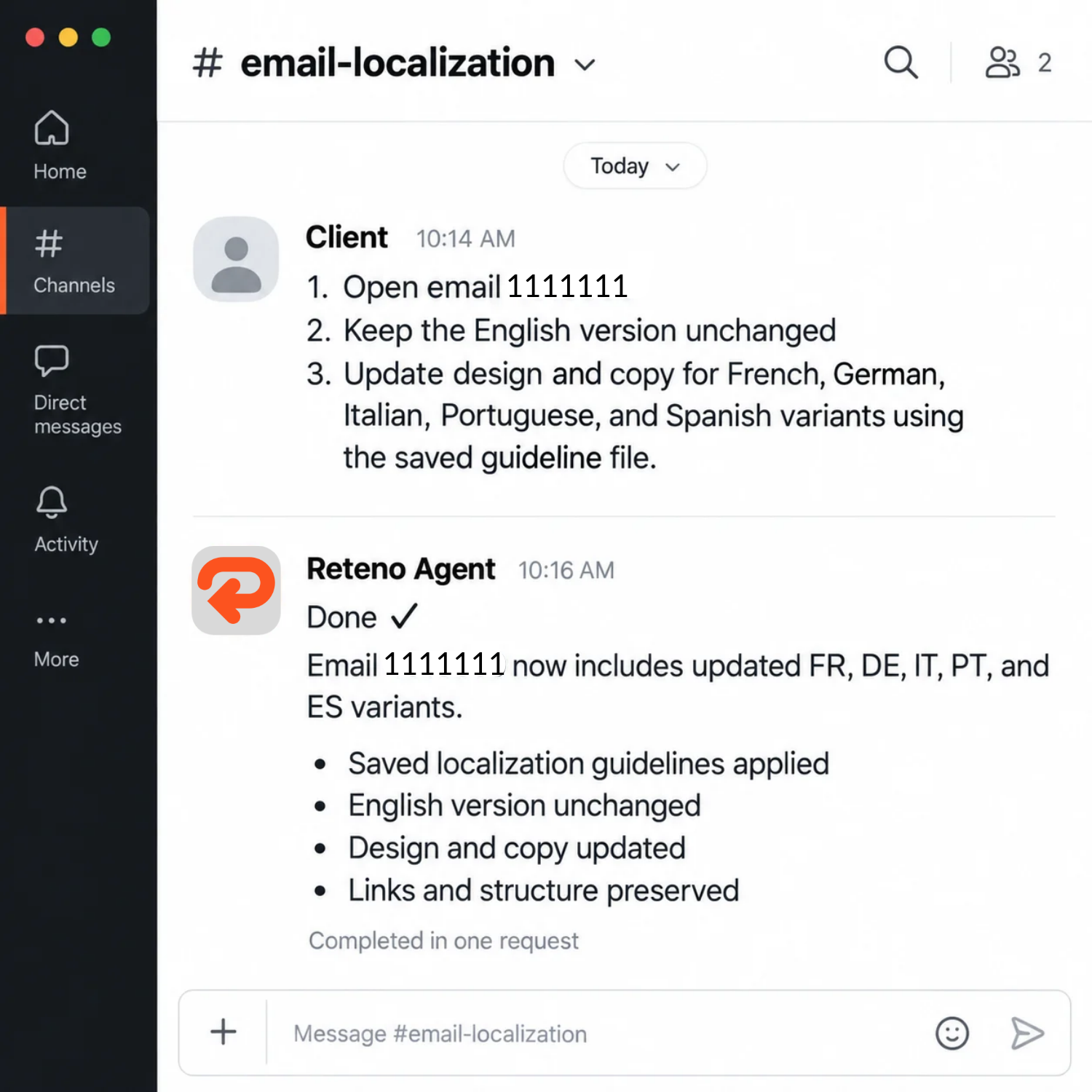
Докладний запит може визначати:
Так вимоги до локалізації стають повторюваними робочими інструкціями, а не інформацією, яку маркетологи мають щоразу пояснювати для кожної кампанії.
Глобальна платформа для досліджень, письма й навчання на основі ШІ нещодавно використала Reteno Agent для локалізації трьох шаблонів листів.
Компанії потрібно було зберегти англійську основною мовою без змін і водночас додати мовні версії безпосередньо до наявних шаблонів.
Для першого листа потрібні були п’ять додаткових мов:
Для кожного з двох наступних шаблонів потрібні були вісім мовних версій:
Інструкції виходили за межі звичайного перекладу. Вони визначали правильну форму звертання для кожної мови, зокрема неформальне «tú» в іспанській, формальне «vous» у французькій, ввічливе «Sie» в німецькій, неформальне «je» в нідерландській і форму Teineigo в японській.
Агента також попросили зберегти початкові посилання, CSS і структуру листа, переклавши тему, прехедер і весь видимий текст.
У трьох шаблонах агент створив 21 локалізовану версію листів.
Перший шаблон із п’ятьма мовними версіями завершили за 6 хвилин і 51 секунду. Один із шаблонів із вісьмома мовними версіями завершили за 3 хвилини й 8 секунд.
Після оновлень перевірили нові експорти актуальних шаблонів. Перевірка підтвердила, що:
Результатом став не просто набір перекладених документів. Компанія отримала повні мовні версії в робочих шаблонах листів, готові до фінальної перевірки людиною та використання в кампаніях.
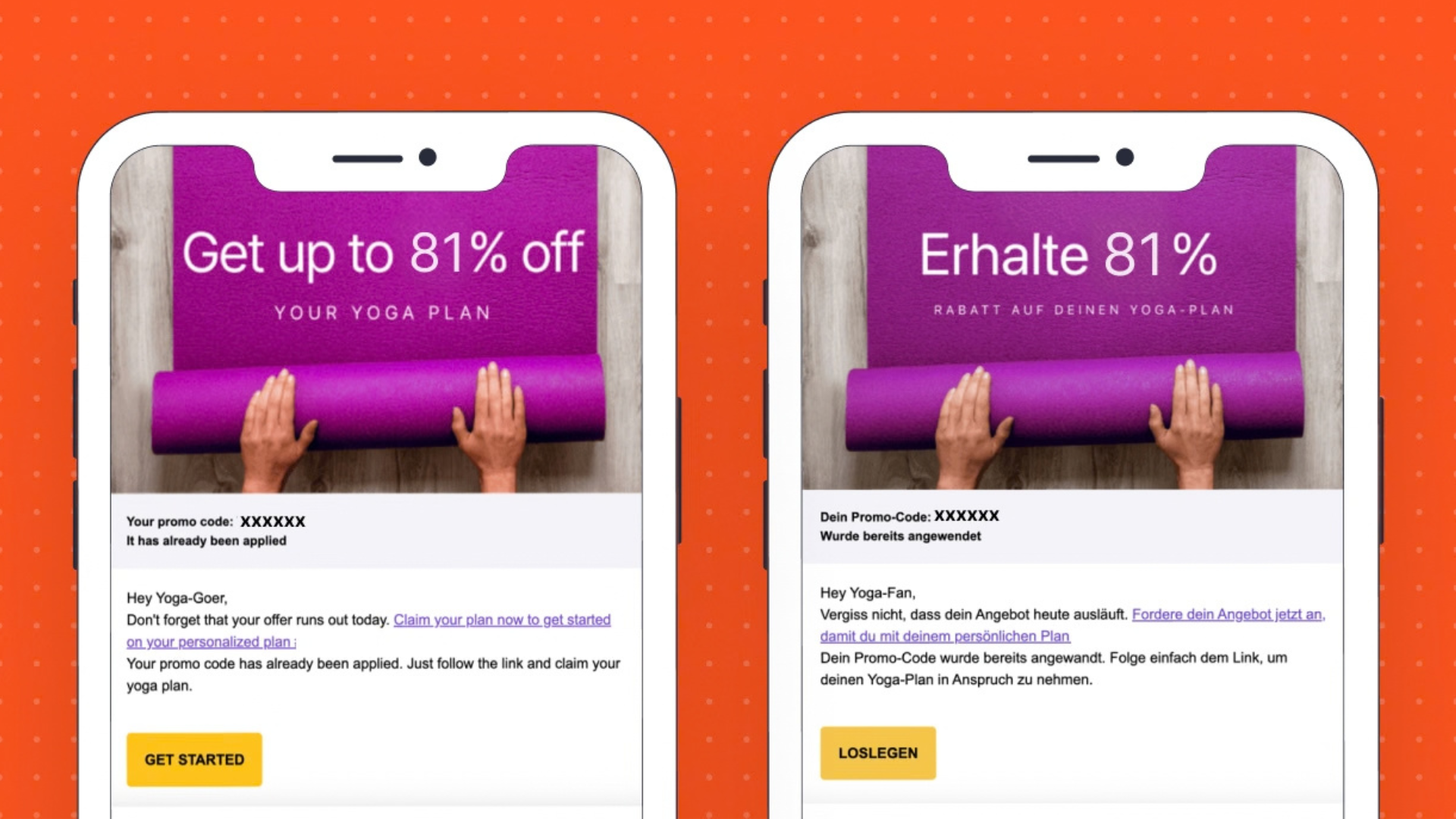
Переклад за допомогою ШІ працює найкраще, коли запит містить чіткі мовні правила й вимоги бренду.
Запит «Переклади цей лист французькою» залишає моделі багато рішень. Краща інструкція пояснює, чи використовує бренд формальну або неформальну мову, як поводитися з назвами продуктів, яку термінологію вже затверджено та які елементи мають залишитися незмінними.
Практичні вимоги до локалізації мають охоплювати щонайменше п’ять напрямів.
Указуйте бразильську португальську, а не просто португальську, або латиноамериканську іспанську, а не просто іспанську, якщо ця відмінність важлива для аудиторії.
Визначте, як має звучати повідомлення: дружньо, професійно, грайливо, прямо, формально чи неформально. Укажіть потрібну форму звертання для мов, у яких цей вибір впливає на кілька слів і структуру речень.
Перелічіть назви продуктів і функцій, галузеві терміни та вислови, які мають бути узгодженими. Якщо термін ніколи не слід перекладати, зазначте це прямо.
Зафіксуйте правила пунктуації, використання лапок і великих літер, форматів дат, систем вимірювання, цін і валют.
Укажіть перекладачу або агенту не змінювати посилання, змінні, HTML-атрибути, CSS, параметри відстеження та інший технічний вміст.
Ці вимоги можна зберігати й повторно використовувати в кампаніях, зменшуючи розбіжності в рішеннях різних перекладачів або під час роботи з окремими листами.
ШІ та Google Sheets підтримують різні етапи одного процесу локалізації.
Reteno Agent корисний для швидкого створення мовних версій, застосування збережених інструкцій і безпосереднього оновлення шаблонів. Google Sheets зручний, коли переклади потребують редагування людиною, залучення зовнішніх перекладачів, юридичної перевірки або погодження регіональними командами.
Поєднаний процес може виглядати так:
Такий розподіл роботи передає ШІ повторювані завдання з підготовки листів, залишаючи мовні рішення та рішення щодо ринків під контролем людей.
Коли компанії виходять на нові ринки, підтримувати окремі листи й сценарії для кожної мови стає складніше. Невеликі зміни тексту перетворюються на масштабні завдання, а кожне додаткове передавання роботи створює ще одну можливість для неузгодженостей.
Reteno зберігає зв’язок мовних версій з оригінальним листом. Команди можуть створювати переклади за допомогою Reteno Agent, співпрацювати через Google Sheets, переглядати імпортовані зміни й надсилати відповідну мовну версію на основі даних контакту.
У результаті процес локалізації може зростати разом із календарем кампаній без пропорційного збільшення повторюваної роботи.
Хочете побачити, як у Reteno працює керування багатомовними розсилками? Замовте демо й підготуйте один зі своїх наявних шаблонів. Ми покажемо, як перетворити його на структуроване багатомовне повідомлення.
(1).png)
(1).png)
.png)

Чи достатньо переконливі ваші push-сповіщення? Перевірте за допомогою нашого безкоштовного інструмента попереднього перегляду. Одразу побачте, як сповіщення виглядатимуть на iOS та Android у розгорнутому й згорнутому вигляді.
Це ваша нагода вдосконалити повідомлення, щоб їх не лише помічали, а й відчували. Нехай кожен символ і кожне push-сповіщення ефективніше працюють на досягнення ваших цілей із залучення


